Time for New Blog Logo…

2 Comments

I just got bored from my old logo image of my blog and so do my readers(i think so!) as its been more than 1 Year and 8 Months since i put the new logo. So i decided to change it. Here’s my new blog image.


New One:

smbtest


Old One:

my-logo

I think its better than the previous one as it has some more 3D look…What do you say?


If you Love Struck loved  my post, then feel free to subscribe to my posts &

get them sent into your Inbox Click here!


How to run old Dos Games and programs on Windows 7 and Vista

3 Comments

db With arrival of new operating systems we have witnessed how the computing has become easy as they are so user-friendly. But with so advantages these operating systems has given rise to compatibility issues with old Programs. My this post will help you run old games and some programs over your new Windows 7 and Vista.


There’s a program called DosBox which helps you to run old Dos Games and Programs very easily over your new OS.


So What is DosBox?


DosBox is virtualization software which is capable of running the old DOS programs and games. It emulates Dos which was installed on Windows 98 & 95 which helps in running old Dos applications.


Here’s a Small Guide on How to Run Old Dos Games in DosBox.

For this I am going to Tell You How to Run DAVE one of the most popular Dos Games on a Windows 7 or Vista PC:


  • You can Download DosBox from www.dosbox.com for Free!. Latest Version available right now is 0.73.


  • Now Install DosBox on your PC.


  • Now here’s the main step. To Run Dave you will have to create Folder in your drive where windows is Installed or any other drive where you want. For instance we are going to do this in C:\> drive.


  • Go to C:\ drive and create a new folder named Dos and copy the Dave game Folder into it.


  • After installation Open Dosbox.exe from Desktop or from the installed directory.


  • You will see a Dos screen with Z:\> as your local drive.


Screen Z:\> (Click to Enlarge)


  • Now write ‘mount c c:\Dos’ and you will see a message saying Drive C is mounted as local directory. It means that your ‘C:\>Dos’ is your local directory.


Screen Mounting (Click to Enlarge)

  • Now write ‘C:’ and press enter. You will enter into C drive.
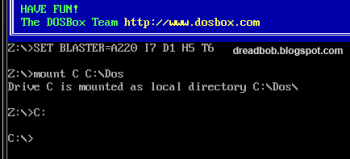
 

Screen C:\> (Click to Enlarge)

  • Write ‘C:\>cd Dave which will take you into C:\>Dave\ .


Screen C:\>Dave (Click to Enlarge)

  • Now Run Dave.exe by typing ‘dave.exe’ or ‘dave’ and pressing enter.


Screen Running Dave (Click to Enlarge)


  • Play and Enjoy the classic Dave on your advanced Windows 7.


 Screen Playing Dave (Click to Enlarge)


This guide applies to all the old Dos Games and applications also. So if you are missing classic old Dos games on your PC then get the DosBox now.


If you Love Struck loved  my post, then feel free to subscribe to my feed Click here!


Google Adsense Do’s and Don’ts

0 Comments

Google ADsense Do's and Don'ts.. Google Adsense is one of the most healthy way of making money online with blogs and websites. Thanks to Google who is helping millions of people around the world make use of their awesome service.


If you have started using Google Adsense or already using Google Adsense then here are some small tips to help you get the best out of this great program:


  • Patience- If you are not getting enough clicks or Clicks on your ads are not changing into money then do not loose patience, as it always takes some time for a Blog to gain readership and get the maximum rate per click. The click to rate conversion depends upon the Page Impressions and unique visitors to your Blog.


  • Stop clicking on your own Ads as Google is smart enough to catch the defaulters and block their accounts if you do this daily. This makes Google watch you with a doubt and finally it may even end up in criminal penalties.


  • Never use Automated Tools for increasing your blogs CPM or clicks on Ads because Google counts this as illegal.


  • Stop asking People to click on your Advertisements. Many people write a line below the ads requesting people to click.


  • Do not form groups to click on each others ads because when simultaneous clicks come from same IP’s again and again, there is no click to rate conversion.


  • Do not put excess of Google Adsense ads on your pages as it distracts most of the visitors from visiting your blog and hence decreases the readership of your blog.


In the end I would say that let the visitors click naturally on your ads and then you would see that even small clicks leads to good rate conversions.


If you Love Struck loved  my post, then feel free to subscribe to my post &

get them sent into your Inbox Click here!


Google launches its new Homepage with Animation

0 Comments

Google Transforming.. You must be amazed with the new Google homepage you are seeing these days. Google has officially released its new homepage with an animation effect.


What has Changed ?

 Google's New Homepage (Click to Enlarge)

Now when you open Google, there are no links visible on the screen but when you move your cursor over the Google Homepage the links appear magically with a fade in effect.


This is a cool thing brought up by Google for changing their boring screen to some kind of a visual treat to eyes of its users.


Here’s the video:


Google's Got a New look


If you Love Struck loved  my post, then feel free to subscribe to my post &

get them sent into your Inbox Click here!